Getting Started
This series of articles records my process of reading the Codex source code to deeply understand how an AI code agent works.
I focus on the high level overview first and intentionally skip some 'technical details' to get a basic understanding of an AI code agent, even though sometimes it relates to high level design.
Pre-knowledge:
- tried LLM models via chat such as ChatGPT, Gemini.
- tried AI code agents such as Claude Code, Cursor, Codex etc.
The fundamental understanding should be LLM can understand, think and output results based on human language input, and code agents have defined some abilities(file read and write, shell execute, etc...)
Preparation
The whole series of code are based on tip commit 5ceff65 as of now(7 Mar 2026), and the codex client code are put inside codex-rs.
Boundary to LLM
Request to LLM Server and Get Response
We start from what we already know, that LLM can receive requests and respond as we chat with it before. Hence, we will step into the request-response action, and it happened at codex-rs/core/src/codex.rs:L5366, function call run_sampling_request inside run_turn, it sends the request out and the response in.
match run_sampling_request(...).await
{
    Ok(sampling_request_output) => {
        let SamplingRequestResult {
            needs_follow_up,
            last_agent_message: sampling_request_last_agent_message,
        } = sampling_request_output;
        ...
    }
    ...
}
Note: sampling is a term specific to LLM server side as essentially LLM outputs the response based on probability and this is called sampling. In short, sampling is the process by which the LLM generates and outputs a response to the client (Codex).
The code above shows codex sends a request out, gets response and processes it. But see the SamplingRequestResult, it contains very limited information. The first question in my mind is why it's so simple, and where the huge amount of content (like LLM thinking, answers, tool calls, etc.) is.
The Codex implementation processes responses across two dimensions: data flow and control flow. The snippet above handles the control flow, dictating whether to halt or continue interaction with the LLM.
Understand LLM Server API and Codex Prompt Struct
Stepping into run_sampling_request, we see some concrete data structures, the most important structure is Prompt, an API request payload presentation inside rust code.
/// API request payload for a single model turn
#[derive(Default, Debug, Clone)]
pub struct Prompt {
    /// Conversation context input items.
    pub input: Vec<ResponseItem>,

    /// Tools available to the model, including additional tools sourced from
    /// external MCP servers.
    pub(crate) tools: Vec<ToolSpec>,

    /// Whether parallel tool calls are permitted for this prompt.
    pub(crate) parallel_tool_calls: bool,

    pub base_instructions: BaseInstructions,

    /// Optionally specify the personality of the model.
    pub personality: Option<Personality>,

    /// Optional the output schema for the model's response.
    pub output_schema: Option<Value>,
}
Prompt contains necessary information to construct the request when calling the OpenAI /responses API.
input
The input maps to the input field of request and consists of various kinds of types, and you can check the docs to see more details.
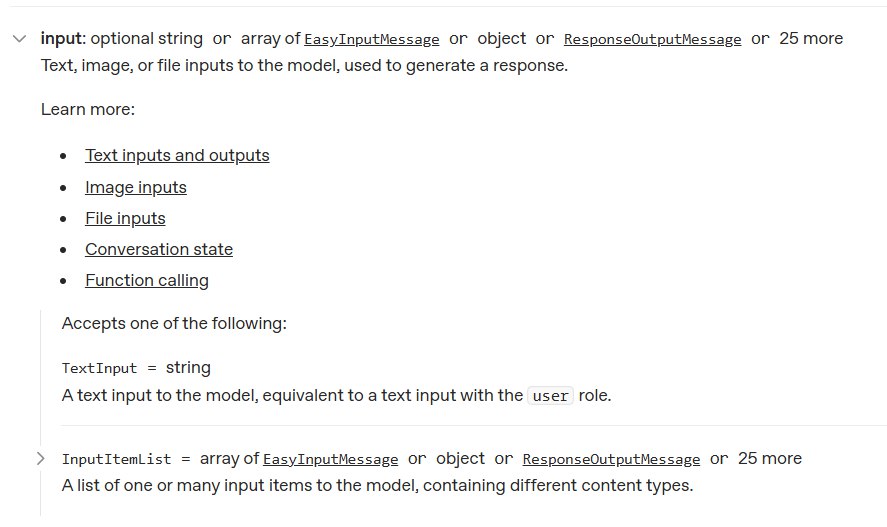
rust enum definition for ResponseItem(codex-rs/protocol/src/models.rs:L248)
#[derive(Debug, Clone, Serialize, Deserialize, PartialEq, JsonSchema, TS)]
#[serde(tag = "type", rename_all = "snake_case")]
pub enum ResponseItem {
    Message { .. },
    Reasoning { .. },
    LocalShellCall { .. },
    FunctionCall { .. },
    FunctionCallOutput { .. },
    CustomToolCall { .. },
    CustomToolCallOutput { .. },
    WebSearchCall { .. },
    ImageGenerationCall { .. },
    GhostSnapshot { .. },
    #[serde(alias = "compaction_summary")]
    Compaction { .. },
    #[serde(other)]
    Other,
}
tool
Tools are also defined by the server side and come in several types, and the Codex implementation has defined an enum for them.
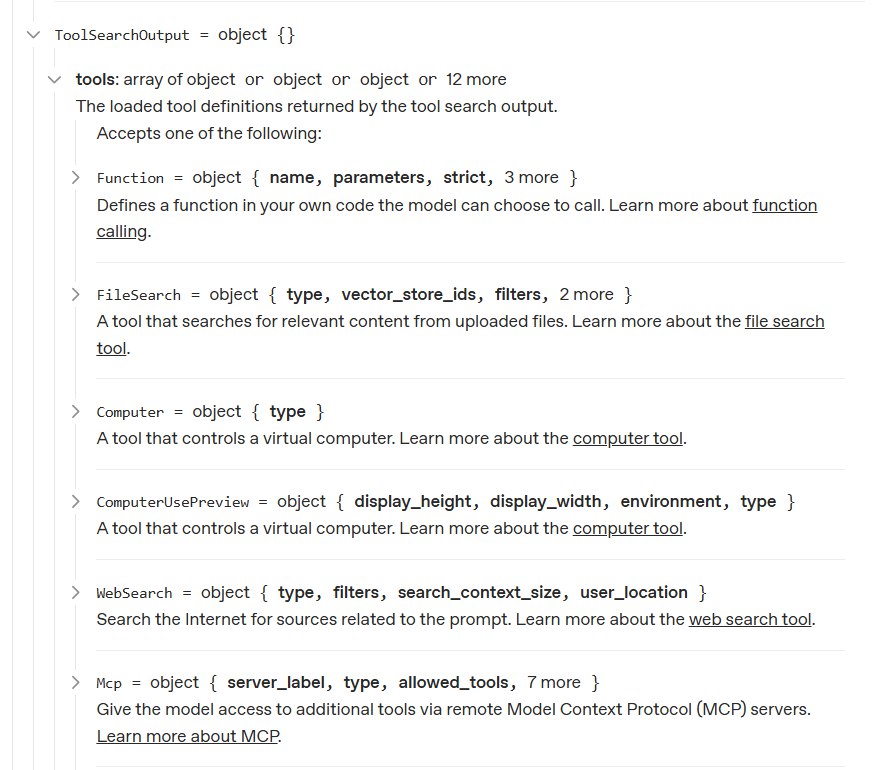
rust enum definition for ToolSpec(codex-rs/core/src/client_common.rs:L169)
    #[derive(Debug, Clone, Serialize, PartialEq)]
    #[serde(tag = "type")]
    pub(crate) enum ToolSpec {
        #[serde(rename = "function")]
        Function(..),
        #[serde(rename = "local_shell")]
        LocalShell { .. },
        #[serde(rename = "image_generation")]
        ImageGeneration { .. },
        #[serde(rename = "web_search")]
        WebSearch { .. },
        #[serde(rename = "custom")]
        Freeform(..),
    }
Base Instruction
Base instructions, as the name suggests, are defined to help the LLM understand what Codex is, since it lacks this context from its initial training. It's possible to override the base instruction via configuration but STRONGLY DISCOURAGED by Codex authors.
Users are STRONGLY DISCOURAGED from using this field, as deviating from the instructions sanctioned by Codex will likely degrade model performance.
The base instruction is defined at codex-rs/protocol/src/prompts/base_instructions/default.md:
You are a coding agent running in the Codex CLI,
a terminal-based coding assistant.
Codex CLI is an open source project led by OpenAI.
You are expected to be precise, safe, and helpful.

Your capabilities:

- Receive user prompts and other context provided by the harness,
  such as files in the workspace.
- Communicate with the user by streaming thinking & responses,
  and by making & updating plans.
- Emit function calls to run terminal commands and apply patches.
  Depending on how this specific run is configured,
  you can request that these function calls be escalated to the user
  for approval before running.
  More on this in the "Sandbox and approvals" section.

Within this context,
Codex refers to the open-source agentic coding interface
(not the old Codex language model built by OpenAI).

... more lines ...
Construct Request and Send Request
The function run_sampling_request calls build_prompt to construct a prompt for current turn. The prompt passes through try_run_sampling_request and finally processed by stream (codex-rs/core/src/client.rs:L976).
Function stream selects the proper protocol (WebSocket or HTTP) to send out the request. Regardless of the protocol, both of them are streamable. Why and how it allows different protocol uses are implementation details and won't be discussed here.
Moreover, the serialization of prompt is done by concrete way to send requests, as websocket increases some extra fields.
pub async fn stream(
    &mut self,
    prompt: &Prompt,
    ...
) -> Result<ResponseStream> {
    let wire_api = self.client.state.provider.wire_api;
    match wire_api {
        WireApi::Responses => {
            if self.client.responses_websocket_enabled(model_info) {
                match self.stream_responses_websocket(
                        prompt,
                        ...
                    ).await?{ ... }
            }
            self.stream_responses_api(
                prompt,
                ...
            ).await
        }
    }
}
Note: WebSocket uses a different but almost the same structure to represent the request, and it's defined as ResponseCreateWsRequest, which could be derived from ResponsesApiRequest via from function defined at codex-rs/codex-api/src/common.rs:L164. Hence, I only introduce how streamable http constructs the request to continue.
The ResponsesApiRequest is constructed by build_responses_request (codex-rs/core/src/client.rs:L783) with prompt, and it's the full representation of the OpenAI API /responses.
let request = self.build_responses_request(
    &client_setup.api_provider,
    prompt,
    model_info,
    effort,
    summary,
    service_tier,
)?;
let stream_result = client.stream_request(request, options).await;
After serialization, what the LLM server actually receives is a JSON like this (simplified):
{
  "model": "gpt-5.1",
  "instructions": "You are a coding agent running in the Codex CLI...",
  "input": [
    {
      "type": "message",
      "role": "user",
      "content": [
        {
          "type": "input_text",
          "text": "list files in the current directory"
        }
      ]
    }
  ],
  "tools": [
    {
      "type": "function",
      "name": "shell",
      "description": "Runs a shell command...",
      "strict": false,
      "parameters": {
        "type": "object",
        "properties": {
          "command": { "type": "string" },
          "workdir": { "type": "string" }
        }
      }
    }
  ],
  "tool_choice": "auto",
  "parallel_tool_calls": false,
  "reasoning": { "effort": "medium", "summary": "concise" },
  "stream": true,
  "store": false,
  "include": ["reasoning.encrypted_content"]
}
The instructions field carries the base instructions. The input field is the conversation history. The tools field describes what abilities the model can invoke. And stream: true tells the server to return events incrementally.
Request is sent out after construction, and get ResponseStream from server for codex to process.
Response Process
Understand Events from Server
Codex sends requests to the LLM server with streaming enabled, so it receives events from LLM server as well. Struct ResponseEvent(codex-rs/codex-api/src/common.rs:L56) represents the events.
pub enum ResponseEvent {
    Created,
    OutputItemDone(ResponseItem),
    OutputItemAdded(ResponseItem),
    ServerModel(String),
    ServerReasoningIncluded(bool),
    Completed { ... },
    OutputTextDelta(String),
    ReasoningSummaryDelta { ... },
    ReasoningContentDelta { ... },
    ReasoningSummaryPartAdded { ... },
    // ...
}
ResponseEvent is designed to hide underlying details from real responses and provides a new abstract layer for event consumers to use more easily. The real processing logic happens at spawn_response_stream (codex-rs/codex-api/src/sse/responses.rs:L52), which analyzes the raw responses.
How the client handles the streaming responses and constructs these events is an implementation detail that is out of scope for this post.
The stream is consumed by a loop (codex-rs/core/src/codex.rs:L6585-6842) that processes events one by one. Two things happen inside this loop: data is dispatched to external consumers in real time, and a control flow signal is accumulated and returned when the loop ends.
Data Flow Process
Data flow is processed in real-time within the stream loop. All data leaves the loop through the Session object (sess), which acts as the central hub.
The code snippet briefs how the data is dispatched:
let outcome: CodexResult<SamplingRequestResult> = loop {
    let event = match stream.next().await { ... };

    match event {
        ResponseEvent::OutputItemAdded(item) => {
            sess.emit_turn_item_started(...).await;
        }
        ResponseEvent::OutputTextDelta(delta) => {
            sess.send_event(..., EventMsg::AgentMessageContentDelta(...)).await;
        }
        ResponseEvent::ReasoningContentDelta { .. } => {
            sess.send_event(..., EventMsg::ReasoningRawContentDelta(...)).await;
        }
        ResponseEvent::OutputItemDone(item) => {
            let output_result = handle_output_item_done(...).await?;
            if let Some(tool_future) = output_result.tool_future {
                in_flight.push_back(tool_future);
            }
            needs_follow_up |= output_result.needs_follow_up;
        }
        ResponseEvent::Completed { .. } => {
            break Ok(SamplingRequestResult { needs_follow_up, ... });
        }
        _ => {}
    }
};
Understanding asynchronous dispatching is sufficient here. The internal mechanism of send_event is out of scope and will be covered in future posts.
Control Flow Process
Unlike the "fire-and-forget" data flow, the control flow acts as a state accumulator throughout the stream's lifecycle. This explains why the SamplingRequestResult is so simple: it only dictates the macroscopic routing.
let mut needs_follow_up = false;
let mut last_agent_message = None;

let outcome: CodexResult<SamplingRequestResult> = loop {
    let event = match stream.next().await { ... };

    match event {
        ResponseEvent::OutputItemDone(item) => {
            let output_result = handle_output_item_done(...).await?;

            needs_follow_up |= output_result.needs_follow_up;

            if let Some(agent_message) = output_result.last_agent_message {
                last_agent_message = Some(agent_message);
            }
        }
        ResponseEvent::Completed { .. } => {
            needs_follow_up |= sess.has_pending_input().await;

            break Ok(SamplingRequestResult {
                needs_follow_up,
                last_agent_message
            });
        }
        _ => {}
    }
};
By using the bitwise OR operator (|=), Codex evaluates if any action within the entire stream (like a model's tool call) requires further interaction. If needs_follow_up becomes true, the outer run_turn will automatically initiate the next run_sampling_request after processing the tools, forming the basis of the Agent's autonomous loop.
Conclusion
This post provides a basic understanding of an AI code agent. After reading this post, you should understand the boundary between an AI code agent and an LLM. You should also have a basic understanding of the following items:
- How Codex interacts with the OpenAI API (specifically the
/responsesendpoint). - How prompts and tool schemas are defined and used to construct requests.
- The role of Base Instructions in providing the LLM with necessary context about the Codex environment, and the rationale for avoiding manual overrides.
- The dual-track architecture of processing streaming responses: real-time Data Flow for external dispatch and accumulated Control Flow for autonomous routing.
- How Codex abstracts raw server streaming responses into the ResponseEvent structure to simplify downstream event consumption.
In the upcoming posts in this series, we will dive deeper into the details omitted in this overview.